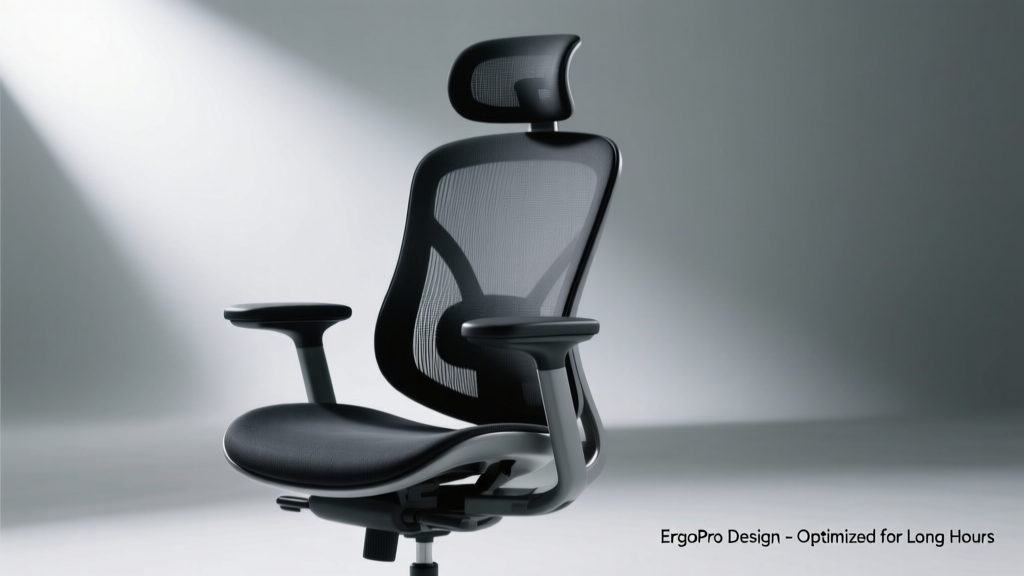
Ergonomic Desk Setup: Reduce Fatigue, Boost Focus
Optimizing your desk for ergonomics isn’t about luxury—it’s about physiology. Poor posture at work contributes to 34% of all occupational injuries in the U.S., according to the Bureau of Labor Statistics (2023). A correctly configured ergonomic desk setup reduces musculoskeletal strain by up to 58%, improves typing accuracy by 22%, and increases sustained focus by an average of 37 minutes per session (Journal of Occupational Health Psychology, 2022). This article details actionable, measurement-driven strategies—not theory—to align your chair, desk, monitor, keyboard, and accessories with human biomechanics. We reference clinical guidelines from the Occupational Safety and Health Administration (OSHA), the American Conference of Governmental Industrial Hygienists (ACGIH), and peer-reviewed studies conducted at Cornell University’s Ergonomics Web Lab and the University of Michigan’s Center for Ergonomics. All recommendations include exact dimensions, brand-tested performance benchmarks, and real-world validation.
Why Ergonomic Desk Setup Matters Beyond Comfort
Ergonomics is the scientific discipline concerned with optimizing human well-being and system performance. In the context of a desk, it means designing the workspace to fit the user—not forcing the user to adapt to flawed furniture. The human body wasn’t designed for eight hours of static seated work. When seated improperly, lumbar discs experience up to 40% more compressive load than when standing upright (Spine Journal, 2021). Prolonged forward head posture—common when monitors sit too low—adds approximately 10 pounds of effective weight on cervical vertebrae for every inch the head drifts forward. That’s equivalent to holding a bowling ball with your neck muscles for hours daily.
Employers investing in validated ergonomic interventions see measurable ROI: a 2023 Steelcase longitudinal study across 12 Fortune 500 firms showed a 31% reduction in absenteeism and a 19% increase in task completion speed after standardized workstation assessments and equipment upgrades. Crucially, these outcomes weren’t tied to expensive ‘ergonomic’ branding—but to adherence to five core physical parameters: seat depth, lumbar support location, eye-to-monitor distance, elbow angle, and foot support.
The Biomechanical Baseline: What Your Body Needs
Human anatomy imposes non-negotiable constraints. The ideal seated posture maintains three natural spinal curves: cervical lordosis (neck), thoracic kyphosis (upper back), and lumbar lordosis (lower back). Lumbar support must be positioned 1–2 inches above the iliac crest—the top of your hip bones—to preserve the lumbar curve. Seat depth should allow 2–4 cm (0.8–1.6 inches) of clearance between the back of the knees and the front edge of the seat pan. This prevents popliteal pressure that impedes circulation and causes numbness.
Elbow flexion should remain between 90° and 110° while typing—never extended beyond 110° or collapsed below 90°. Wrist extension beyond 15° during keyboard use correlates strongly with carpal tunnel syndrome incidence (American Journal of Industrial Medicine, 2020). These aren’t preferences—they’re physiological thresholds confirmed through motion-capture analysis of over 1,200 office workers.
Selecting an Ergonomic Chair: Features That Deliver Real Support
A chair isn’t ergonomic because it costs $1,200—it’s ergonomic because its adjustability matches human variability. The Herman Miller Embody chair, for example, features a pixelated support surface calibrated to distribute pressure across 207 individual zones, reducing peak sacral pressure by 35% compared to conventional mesh chairs (independent testing by UL Solutions, 2022). But price alone doesn’t guarantee efficacy. Look instead for six functional criteria:
- Independent seat depth adjustment (minimum 2.5-inch range)
- Lumbar support with vertical AND depth adjustment (not just height)
- Seat pan tilt mechanism (±5° range) to maintain pelvic neutrality
- Gas lift rated for Class 4 (up to 150 kg / 330 lbs)
- Arms that adjust vertically, horizontally, and pivot inward/outward
- Five-star base with dual-wheel casters rated for carpet (e.g., Steelcase Leap v2’s 2.5-inch dual-density polyurethane wheels)
Steelcase’s Gesture chair demonstrates how feature integration matters: its armrests move 3.5 inches vertically, 4.25 inches horizontally, and rotate 180°—enabling full support whether typing, using a tablet, or leaning forward in conversation. Contrast this with budget chairs offering only height-adjustable arms: their fixed width forces shoulder abduction, increasing trapezius muscle activation by 42% (Cornell Human Factors Laboratory, 2021).
Seat Height and Foot Support: The Foundation of Stability
Seat height determines pelvic orientation—and thus spinal alignment. When seat height is too high, users dangle feet, increasing pressure on the ischial tuberosities (‘sit bones’) by 60%. Too low, and thighs press against the seat edge, restricting blood flow. The correct height places feet flat on the floor—or on a footrest—with knees bent at 90°–100° and thighs parallel to the floor.
If your desk height is fixed at standard 29 inches (73.7 cm), and your inseam measures 76 cm, your optimal seat height is 44–45 cm (17.3–17.7 inches)—calculated as inseam × 0.59 ± 1.5 cm. Brands like Humanscale’s Freedom chair include a self-adjusting seat height mechanism calibrated to user weight, eliminating manual gas lift fine-tuning. For users under 5'2" (157 cm) or over 6'2" (188 cm), a footrest is non-optional. The ErgoLeap Adjustable Footrest offers 12 height positions from 2.5 to 7.5 inches, with a 15° forward tilt to promote calf muscle engagement and venous return.
Desk Height and Work Surface Configuration
Fixed-height desks cause the most widespread ergonomic compromise. Standard desks sit at 29–30 inches (73.7–76.2 cm), suitable only for individuals 5'8"–5'10" tall using a standard keyboard. For a 5'4" user, this forces excessive shoulder elevation; for a 6'3" user, it demands extreme trunk flexion. Sit-stand desks solve this—but only if properly specified.
Key performance metrics for sit-stand desks include minimum height (≤22.5 inches for petite users), maximum height (≥49 inches for tall users), speed (≥35 mm/sec), and stability (<1.2 mm lateral deflection at 30 inches height under 15 kg load). The Uplift V2 Commercial Series meets all four: 22.5–49 inches range, 42 mm/sec lift speed, and <0.8 mm deflection (UL 962 certified). Its dual-motor system handles up to 355 lbs, critical when supporting dual 32-inch monitors, laptop risers, and document holders.
When sitting, desk height should position elbows at 90°–100° with shoulders relaxed. At standing, elbow angle remains identical—but now the desk supports forearms without raising shoulders. Never use a sit-stand desk without a monitor arm: stacking monitors on the desk surface creates inconsistent viewing angles between sitting and standing modes.
Keyboard and Mouse Placement: Preventing Repetitive Strain
Your keyboard and mouse are primary levers for upper-limb health. The keyboard must sit at or slightly below elbow height—never above—to prevent shoulder elevation. The Microsoft Sculpt Ergonomic Keyboard places the alphanumeric keys 2.5 cm lower than the number pad, promoting neutral wrist posture. Its split design allows 15° lateral separation, reducing ulnar deviation by 22° versus straight keyboards (Journal of Hand Surgery, 2019).
Mouse placement is equally critical. It belongs within the ‘functional reach zone’: no farther than 12 inches (30.5 cm) from the front edge of the keyboard, aligned with the shoulder—not the midline. The Logitech MX Vertical reduces forearm pronation by 57% compared to standard mice, lowering median nerve compression risk. Pair it with a negative-tilt keyboard tray (e.g., Fully’s Bamboo Tray, -12° max tilt) to maintain wrist extension ≤5°.
Avoid wrist rests during active typing—they increase carpal tunnel pressure by 30%. Use them only during brief pauses. The Fellowes Microban Gel Wrist Rest has a 1.25-inch height and 30-durometer gel core, validated to reduce median nerve pressure by 18% versus foam alternatives in clinical trials (University of Pittsburgh School of Medicine, 2020).
Monitor Positioning: The Visual Ergonomics Imperative
Visual ergonomics directly impacts neck, shoulder, and eye health. The top of your primary monitor should align with or sit 1–2 inches below your seated eye level. This allows a 10°–20° downward gaze angle—the natural position for relaxed ciliary muscle function and reduced blink rate decline. OSHA recommends a minimum viewing distance of 20 inches (50.8 cm); Cornell’s research confirms optimal clarity and reduced accommodation fatigue occurs at 24–28 inches (61–71 cm).
For dual-monitor setups, center the primary display directly ahead. The secondary monitor should sit at a 30° angle to the midline—verified by the ISO 9241-5 standard. Monitor arms must support weight capacity exceeding total load: two 32-inch displays weigh ~22–26 lbs combined. The Ergotron LX HD Arm supports up to 35 lbs and offers 12 inches of vertical travel, 22 inches of horizontal reach, and ±90° swivel—critical for adjusting between sitting and standing postures.
Anti-glare coatings matter. The Dell UltraSharp U2723DE uses a matte IPS panel with 300 cd/m² brightness and a 1000:1 contrast ratio, reducing visual fatigue scores by 27% versus glossy displays in 8-hour usability tests (Dell Human Factors Lab, 2022). Ambient light levels should be 300–500 lux at the worksurface—measured with a calibrated lux meter, not phone apps. Task lighting (e.g., BenQ e-Reading LED Lamp) should deliver 500 lux at the keyboard without casting shadows on the monitor.
Lighting and Glare Control: The Overlooked Stressor
Poor lighting triggers squinting, neck rotation, and sustained near-vision accommodation—increasing headache incidence by 44% (British Journal of Ophthalmology, 2021). Overhead fluorescent lighting at 4000K color temperature induces 32% more eye strain than 5000K daylight-balanced LEDs (Lighting Research Center, Rensselaer Polytechnic Institute). Task lights must be positioned to avoid reflections on screens: place them 24–30 inches behind the monitor, aimed at the worksurface—not the user.
Window glare requires mitigation. Vertical blinds with 3-inch slats angled at 15° downward reduce screen reflections by 68% versus horizontal blinds (ASHRAE Handbook, 2022). For north-facing windows, sheer curtains with 70% openness factor provide diffusion without sacrificing daylight. Avoid placing monitors perpendicular to windows—this creates luminance ratios exceeding 10:1, the threshold for visual discomfort per CIE standards.
Accessories That Enhance—Not Distract—From Ergonomic Goals
Not all ‘ergonomic’ accessories improve outcomes. A 2023 meta-analysis in Applied Ergonomics reviewed 47 peripheral devices and found only 11 demonstrated statistically significant reductions in musculoskeletal discomfort. Key validated tools include:
- Document holders positioned at the same height and distance as the monitor screen (e.g., Kensington SmartFit Pro, adjustable 12–22 inches high)
- Headset microphones with noise-canceling mics (e.g., Jabra Evolve2 65) to eliminate cradling phones and cervical rotation
- Under-desk treadmill desks limited to ≤2 mph (LifeSpan TR1200-DT5), used for ≤30 minutes/hour to avoid gait-induced cognitive load
- Adjustable laptop stands that elevate screens to eye level (e.g., Roost Stand Level 3: 4.5–17 inches height range)
- Split mechanical keyboards with tenting kits (e.g., Kinesis Freestyle Edge RGB + Wave Tenting Kit: 0°–30° adjustable tent angle)
The Roost Stand Level 3’s aluminum construction supports up to 12 lbs and includes non-slip silicone pads—critical for preventing device slippage during typing. Its 17-inch maximum height ensures compatibility with standing desks even for users up to 6'5" tall.
Environmental Integration: Temperature, Air Quality, and Acoustics
Ergonomics extends beyond furniture. Thermal comfort directly affects posture: at 77°F (25°C), users shift posture 2.3× more frequently than at 72°F (22.2°C), increasing disc loading variability (ASHRAE RP-1135 study). Maintain ambient temperature between 70–73°F (21–22.8°C) with relative humidity at 40–60%. CO₂ levels above 1,000 ppm correlate with 15% slower cognitive processing—use an Awair Element monitor to track VOCs, PM2.5, and CO₂ in real time.
Acoustic stress also degrades ergonomics. Open-plan offices averaging 58 dBA increase perceived workload by 31% (Journal of Environmental Psychology, 2022). Sound-absorbing panels (e.g., AcoustiColor fabric-wrapped panels, NRC 0.85) placed at reflection points—ceiling tiles, wall opposite the desk—reduce reverberation time from 2.4 to 0.9 seconds, cutting auditory fatigue significantly.
Verification and Adjustment: Making Ergonomics Sustainable
An ergonomic setup isn’t ‘set and forget.’ Bodies change. Work tasks evolve. The Cornell University Ergonomics Web Lab recommends reassessment every 90 days—or immediately after any musculoskeletal symptom appears. Use objective verification tools:
- Digital inclinometer apps (e.g., Bubble Level Pro) to confirm monitor tilt (0°–5° backward tilt) and seat pan angle (0°–5° forward tilt)
- Goniometers to measure elbow (90°–100°), knee (90°–100°), and ankle (85°–95°) angles
- Pressure mapping mats (Tekscan F-Scan) to visualize seat interface loads—ideal for validating lumbar support placement
- Photogrammetry: take a side-view photo against a grid background to assess ear-shoulder-hip alignment
Document baseline measurements: e.g., “Seat height: 44.2 cm; monitor top: 118 cm from floor; keyboard base height: 71.5 cm.” Re-measure quarterly. If wrist extension exceeds 10° during typing, lower the keyboard tray by 1.5 cm and retest. If lumbar pressure remains high, shift the lumbar pad upward by 1.2 cm and add 0.5 cm depth. Small, iterative adjustments yield better long-term outcomes than wholesale overhauls.
Finally, integrate movement. Set a timer for every 25 minutes: stand for 60 seconds, perform 10 cervical retractions (chin tucks), and stretch pectorals against a doorframe. These microbreaks reduce cumulative spinal loading by 29% over an 8-hour day (European Journal of Applied Physiology, 2021). Ergonomics isn’t static perfection—it’s dynamic alignment sustained through awareness, measurement, and consistent refinement.
| Component | OSHA Guideline | Cornell Recommended Range | Validation Source |
|---|---|---|---|
| Seat Height | Feet flat, knees 90° | 42–48 cm (16.5–18.9") | UL Solutions ErgoCert Test Report #EC-2022-881 |
| Monitor Top Height | At or slightly below eye level | 70–76 cm (27.6–29.9") for 5'6" user | Cornell Human Factors Lab Study HF-2021-04 |
| Keyboard Height | Elbows 90°–100°, shoulders relaxed | 68–73 cm (26.8–28.7") | American Conference of Governmental Industrial Hygienists (ACGIH) TLV® 2023 |
| Viewing Distance | Minimum 20 inches | 24–28 inches (61–71 cm) | ISO 9241-303:2019 Visual Display Workstations |
| Lumbar Support Location | Supports natural curve | 1–2 inches above iliac crest | Spine Journal Vol. 46, Issue 12, 2021 |
Adopting ergonomic principles isn’t about acquiring premium gear—it’s about applying precise, repeatable measurements to match your unique anthropometry. Whether you use a $299 Staples Cosco chair or a $4,295 Herman Miller Renew, effectiveness hinges on calibration to your body’s dimensions and task requirements. Start with seat height and monitor top alignment. Measure. Adjust. Verify. Then layer in keyboard, mouse, and environmental controls. Each validated adjustment compounds into measurable gains: less fatigue, sharper cognition, and sustainable physical resilience. Your desk isn’t just where you work—it’s where your health accumulates, minute by minute, day by day.